Nathaniel Picard-Busky
  • Home
  • Media
    • Photos >
      • My Guitars
      • Shows
    • Videos
    • Music
  • Improv Lessons
  • Technical Projects
  • Contact

Electronics Technology Lab Report Number 6

3/27/2014

0 Comments

 
This week in lab I created an oscillator based on a 555 Timer chip. It produced a relatively wide range of frequencies in a rough squarewave pattern:


EXPERIMENTS:
  1. When you press the switch, the signal that is sent to the output is connected to the output and you can hear the signal. When the button is not pressed, there is no connection between the oscillator and output to headphones so pressing the switch will connect the two portions of the circuit and you can hear the signal.
  2. When you press the switch, it connects the output of the circuit to a line to ground so all of the signal bypasses the headphone out and goes straight to ground so when you press the button, you hear nothing.
  3. This circuit works similarly to the switches in 2 and 3, when the potentiometer is turned all the way to one side, for example if it was turned to low resistance, it would pass all the signal to the side that is connected to that pin on the pot. If it is turned to high resistance, it will be sending the signal instead to the other side.

QUESTIONS:

  1. Some common mistakes you can make when building a circuit from a schematic include mistaking wires crossing for junctions in the circuit, mistaking the order of components, and connecting the incorrect pin or connecting a component incorrectly (backwards instead of forwards, etc). These mistakes are easy to make and can cause your circuit not to work or can fry your components. When creating a circuit, careful attention must be paid to every detail. The values of components, direction, and order must be taken into account when mocking up a circuit on a bread board or otherwise.
  2. If you wanted to use the volume of some audio source to control the frequency of this oscillator, you would connect the output of the audio source and connect it to pin 5 on the 555. This pin is the Control Voltage pin and will take the voltage received from the audio source and use it to control the frequency instead of the voltage that was controlled by the voltage divider (potentiometer).
  3. Instead of panning your single signal between left and right in the headphones, it is possible to crossfade between two different signals. Using a similar circuit to the one used for panning, you simply connect the headphones to a potentiometer and the two sources and turning the pot will provide different resistance to each source and allow each to go through to the headphones at any position of the pot.

FINAL PROJECT:

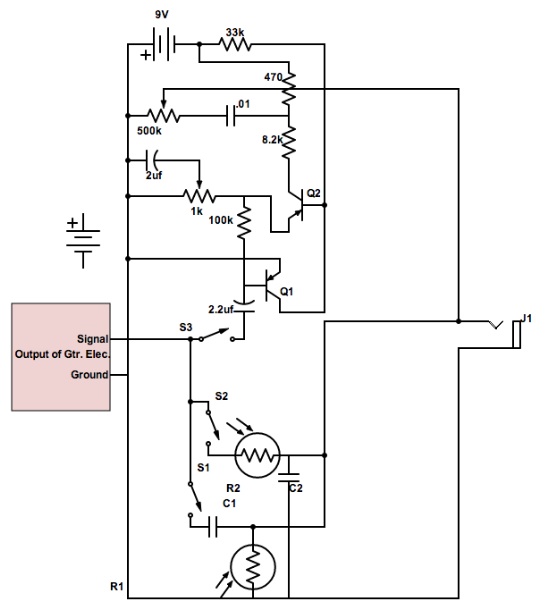
  1. My final project is an onboard proximity-controlled guitar effects collection. With a set of four photoresistors inset into the pick guard, the user will be able to control different aspects of different effects by changing the distance his/her fingers are to the light sensors.
  2. I will need quite a few parts:
    1. 4 photoresistors
    2. replacement pickguard
    3. high-pass filter
    4. low-pass filter
    5. multi-position switches
    6. distortion circuit
    7. envelope follower circuit
  3. Parts that I need to buy:
    1. photoresistors
    2. replacement pickguard
    3. multi-pos switches
    4. any extra components that I may need duplicates to create each effect


Here is a preliminary schematic of my final project. In future drafts, I will add an envelope filter and all variable resistors will be switched to photoresistors:
Picture
0 Comments


Leave a Reply.

    Archives

    May 2017
    May 2015
    April 2015
    March 2015
    February 2015
    May 2014
    April 2014
    March 2014
    February 2014

    Categories

    All
    --> Built In Looper
    --> Onboard Light-Controlled Analog Guitar Effects
    --> Small-Format Multi-Effects Pedal

    RSS Feed

  • Home
  • Media
    • Photos >
      • My Guitars
      • Shows
    • Videos
    • Music
  • Improv Lessons
  • Technical Projects
  • Contact